
The Git is the standard version control system in modern software development. With the ability to track changes and facilitate collaboration between teams, Git allows different versions of the source code to coexist, enabling parallel work and code maintenance.
Branching strategies are roadmaps teams use to organize their work, maintain control of different code versions, and collaborate smoothly. They define how developers should create, use, and integrate branches throughout the software development lifecycle. Without a clear strategy, teams may face challenges such as frequent merge conflicts, difficulty tracking progress, and instability in the main codebase. Git is a flexible tool and allows different forms of collaboration, there is no single solution for every scenario and teams need to choose the branching strategy that best adapts to their needs.
Exploring the Main Git Branching Strategies
Branching strategies evolved to support different development scenarios. Understanding the nuances between them is the first step toward making an informed choice.
Trunk-Based Development (TBD)
In Trunk-Based Development, developers integrate small updates into a main branch, known as the trunk or main. This strategy emphasizes rapid integration with a minimal number of branches, promoting faster iteration.
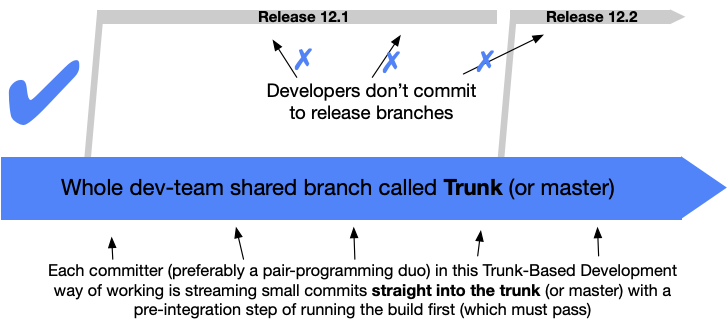
In TBD, developers work directly on the main branch or use short-lived branches, with a lifecycle of a few hours or at most one day, resisting any pressure to create other long-lived development branches. Code integration and testing happen continuously and pull requests are used for code review before merging feature branches into the trunk. A common technique in TBD is the use of “feature flags” to isolate features that are not yet complete, allowing the code to be integrated without affecting the end-user experience.
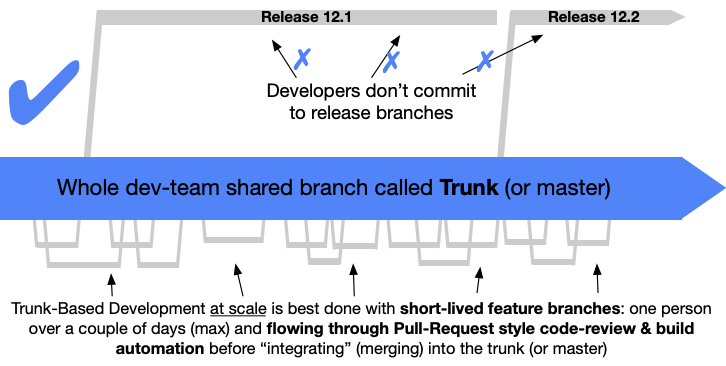
TBD promotes rapid integration and continuous feedback, minimizes merge conflicts, and encourages frequent communication between team members. It facilitates the implementation of Continuous Integration and Continuous Delivery (CI/CD) and reduces complexity by avoiding the proliferation of long-lived branches.
TBD also presents challenges. It requires automated testing to guarantee the stability of the main branch. Attention to the process is essential to avoid problems. If not managed correctly, TBD can still lead to conflicts. In addition, the strategy requires developers to divide their work into small batches, which can be a significant change for some teams. The implementation of TBD can also be challenging in scenarios where maintaining multiple versions of the software is necessary.
Large technology companies such as the Google and the Facebook adopted TBD. Adoption by these organizations demonstrates its scalability and effectiveness for complex projects, as long as there is investment in automation and a well-established culture of collaboration. The ability to continuously integrate and reduce conflicts, even in large-scale projects, outweighs the challenges when supported by automation and rigorous code review practices.
Feature Branching
In the Feature Branching workflow, a new branch is created for each feature from the main branch. Developers work on this branch, making commits as necessary to register progress. Once the feature is complete, a pull request is created to request the integration of the changes back into the main branch. Other developers review the code in the pull request, providing feedback and ensuring quality. After review and approval, the feature branch is merged back into the main branch. Finally, the feature branch is usually deleted because it is no longer necessary.

Feature Branching offers several advantages. It provides clear isolation of changes for each feature, facilitating collaboration because multiple developers can work on different features simultaneously. If a feature introduces problems, its branch can be discarded without affecting the rest of the project. The strategy also facilitates code review and testing processes, resulting in a predictable development workflow.
However, Feature Branching also presents some disadvantages. There is a possibility of merge conflicts, especially if feature branches live for a long period. Managing and keeping many branches updated can become complex. There may be delays in merging changes into the main branch due to extensive reviews. In addition, if branches are not merged regularly, they can become stale, making future integration more difficult.
Feature Branching is a strategy that serves as the foundation for more complex models such as Gitflow and is also adapted into simpler workflows such as GitHub Flow and GitLab Flow. Its flexibility allows it to be used by teams of different sizes and project complexities.
Gitflow
The Gitflow is a structured branching strategy that uses multiple branches with specific purposes, including main, develop, feature, release, and hotfix. This strategy is suitable for projects with well-defined release cycles.
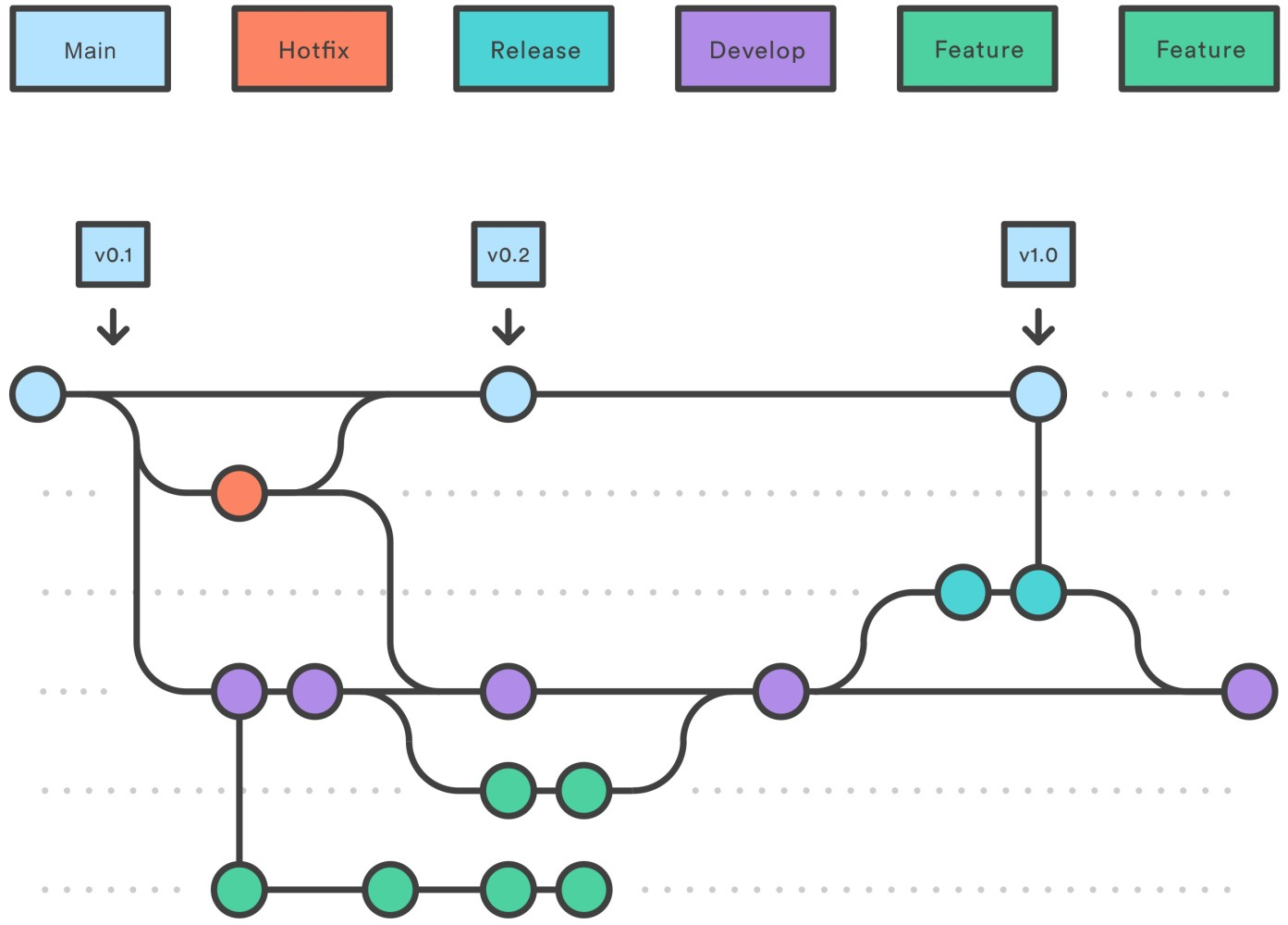
In the Gitflow workflow, the main branch stores the official release history, reflecting a production-ready state. The develop branch serves as the integration branch for features under development. For each new feature, a feature branch is created from develop, and after completion it is merged back into develop. When a set of features is ready to be released, a release branch is created from develop to prepare the release by applying final adjustments and bug fixes. After the final tests, the release branch is merged into both main and develop, and the version in main is tagged with the release number. For urgent production fixes, a hotfix branch is created directly from main. After the fix, it is merged back into main (with a new version tag) and into develop (to guarantee that the fix is included in future releases). Branch naming conventions play a crucial role in this model.
Gitflow offers several advantages. It is well organized and provides a clear workflow for development, testing, and deployment. It is effective for projects with many contributors and supports large teams and complex projects. The isolation of releases guarantees stability during preparation, and the strategy facilitates parallel development.
However, Gitflow also presents disadvantages. It can be complex and slow for smaller projects or for teams seeking continuous delivery. Historically, it does not fully support CI/CD because of its longer development cycle. Gitflow requires strict adherence to the defined processes and may be considered overly prescriptive or inflexible by some teams. Although it was popular in the past, Gitflow has been losing space to lighter strategies such as GitHub Flow and Trunk-Based Development, especially for teams pursuing agility and CI/CD.
“(Git-flow) has become hugely popular in many a software team to the point where people have started treating it like a standard of sorts — but unfortunately also as a dogma or panacea. […] To conclude, always remember that panaceas don’t exist. Consider your own context. […] Decide for yourself.”
(Vincent Driessen, creator of GitFlow)
GitHub Flow
The GitHub Flow is a lighter branching strategy focused on continuous delivery, with only one main branch (main or master) and short-lived feature branches. This approach is suitable for small teams and web applications that do not require support for multiple production versions.
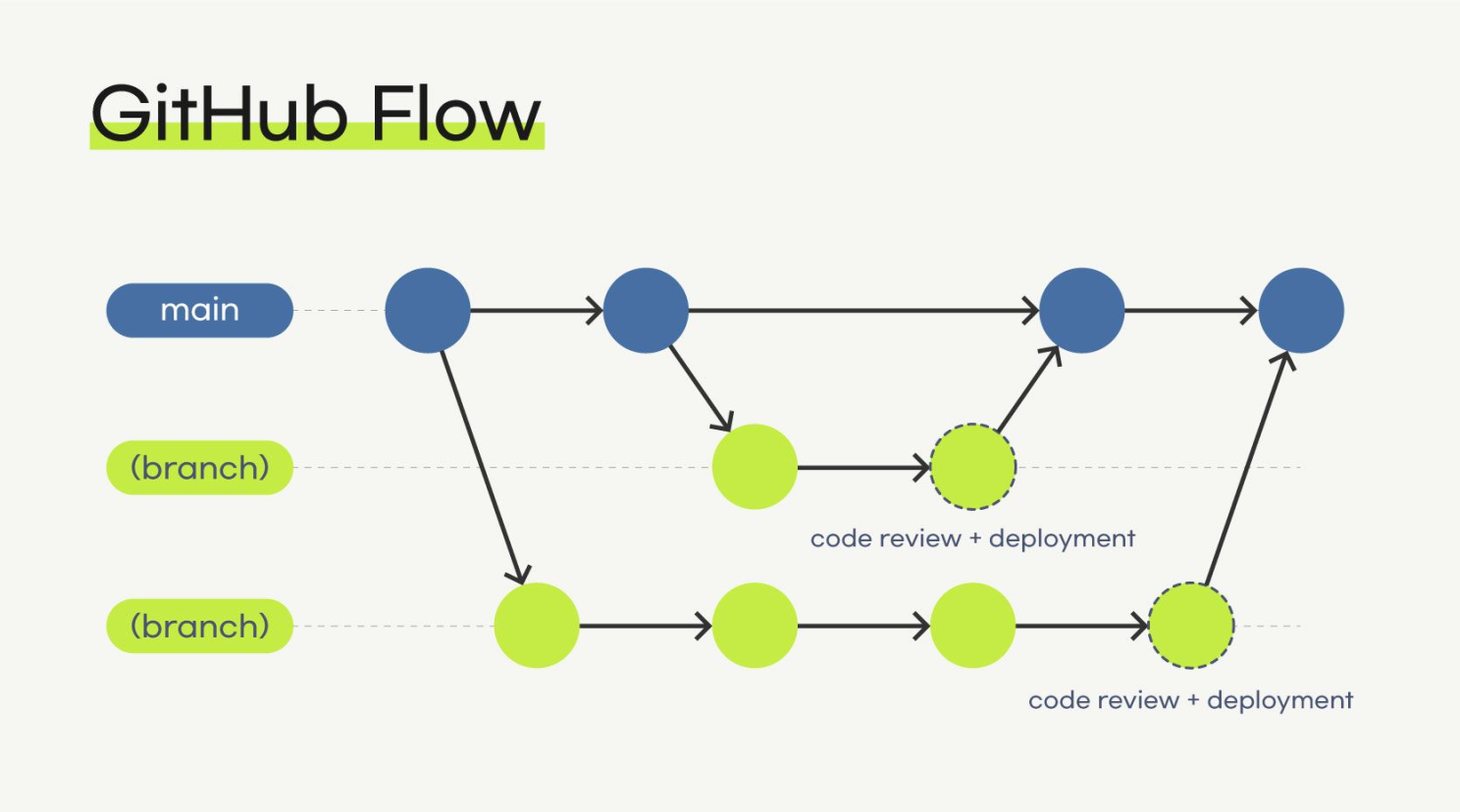
In GitHub Flow, any code in the main branch should be ready to deploy. To work on something new, developers create descriptive branches from the main branch. Commits are made in these local branches and the work is regularly pushed to the remote branch with the same name. When feedback or help is needed, or when the work is considered ready for merge, a pull request is opened. After review and approval by another team member, the branch is merged back into the main branch. Once merged and pushed to main, deployment should happen immediately.
GitHub Flow offers ease of understanding. Its simplicity allows easy implementation of CI/CD. It is ideal for small teams and web applications and promotes faster releases and feedback cycles.
However, GitHub Flow has less structure for complex releases or for supporting multiple production versions.
The popularity of GitHub Flow lies in its simplicity and alignment with agile principles and continuous delivery, making it a preferred choice for modern teams. Its adoption by a leading platform such as GitHub reinforces its practicality and effectiveness.
GitLab Flow
The GitLab Flow is presented as a simpler alternative to Gitflow, combining feature-driven development and environment branches. It seeks a balance between the simplicity of GitHub Flow and the structure of Gitflow, offering more options to manage different environments and releases.
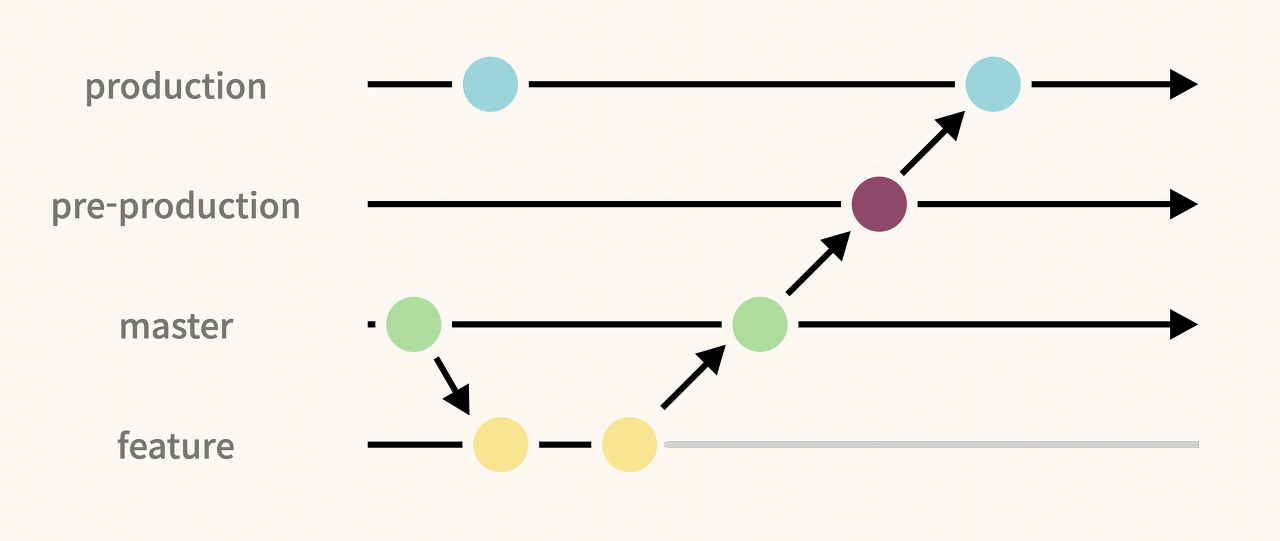
In GitLab Flow, development usually starts in the main branch. The strategy incorporates a pre-production branch to perform bug fixes before changes are merged back into main and deployed to production. Teams can add as many pre-production branches as necessary for their workflows, such as test, acceptance, and production. Commits flow from main to the pre-production branches and finally to the production branch, guaranteeing that each line of code is tested in all relevant environments. One of the distinctive characteristics of GitLab Flow is its integration with an issue tracking system, where every significant code change should be associated with an issue describing the purpose of the change.
GitLab Flow offers several advantages. It provides flexibility to collaborate and maintain multiple software versions across different environments. The strategy reduces the overhead associated with releases, tagging, and merges, which can be challenging in other workflows. It is particularly useful for teams that want to maintain a staging environment separated from production. GitLab Flow is built with DevOps practices in mind, facilitating integration with CI/CD pipelines.
Although it offers more flexibility than GitHub Flow, GitLab Flow can become complex with a large number of environment branches. In addition, it requires discipline to guarantee that commits follow the correct flow.
GitLab Flow seeks a balance between the simplicity of GitHub Flow and the structure of Gitflow, offering more options to manage different environments and releases. As an alternative to Gitflow, the emphasis on alignment with specific environments suggests that GitLab Flow was designed to address some limitations of GitHub Flow in more complex deployment scenarios.
Other Strategies
In addition to the main strategies, there are other approaches that may be suitable for specific scenarios:
- Main-Only Strategy: In this strategy, the main branch is used for both development and deployment. It is a simple approach suitable for small teams or very simple projects, but it is not scalable for larger projects or teams with many contributors.
- Release Branching: In this strategy, separate branches are maintained for each software release version. This approach is useful for maintaining a clear history of all releases and guaranteeing that the main branch remains stable and ready for new features. It also facilitates the application of patches and bug fixes in specific versions without affecting others.
Comparing the Strategies
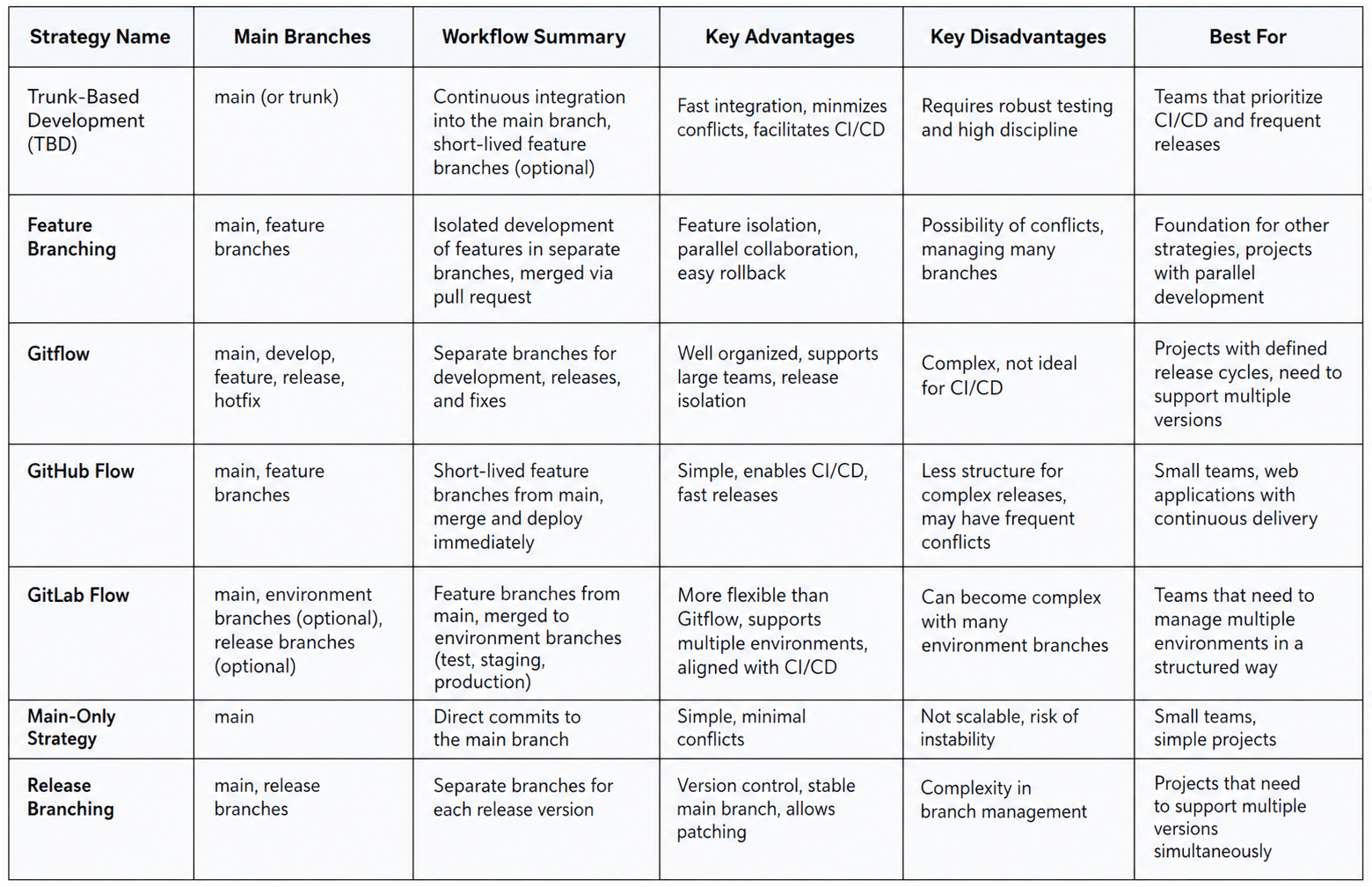
To help visualize the differences between the main Git branching strategies, the following table summarizes their characteristics, advantages, and disadvantages:
How to Choose the Right Strategy for Your Project
Selecting the ideal branching strategy is not a trivial decision and depends on a variety of interconnected factors.
The size and structure of the development team play a crucial role. Smaller teams may find simpler strategies such as GitHub Flow or Main-Only more suitable, while larger teams may benefit from the organization and structure of GitLab Flow.
The complexity and scope of the project are also important considerations. More complex projects generally require more organization.
The frequency and type of releases (continuous versus versioned) significantly influence the choice. Teams practicing Continuous Integration and Continuous Delivery (CI/CD) usually lean toward GitHub Flow or Trunk-Based Development.
Team maturity and discipline should also be considered. Trunk-Based Development, for example, requires a high level of discipline and robust automated testing to avoid instability in the main branch.
The need to support multiple simultaneous versions is another important factor. If the project requires maintaining several production versions, Gitflow or Release Branching may be more appropriate.
Compliance requirements and the organization’s specific release processes can also influence the decision. Some industries may have stricter release processes that align better with structured strategies such as Gitflow.
The type of product and its release method are also relevant. For example, mobile applications with defined release windows may benefit from strategies such as Gitflow or GitLab Flow with release branches.
Finally, the team’s risk tolerance may play a role in the decision. Strategies with more frequent integration, such as TBD, may require greater confidence in automation and testing.
Choosing a branching strategy is not an isolated decision, but one that should align with team culture, project goals, and software delivery processes.
Conclusion
Choosing the ideal Git branching strategy is a crucial decision that directly impacts how a development team collaborates and delivers software. The main strategies discussed — Trunk-Based Development, Feature Branching, Gitflow, GitHub Flow, and GitLab Flow — offer different approaches with their own advantages and disadvantages. The Main-Only strategy and Release Branching address more specific needs.
The selection of the most appropriate strategy should be carefully considered, taking into account team size, project complexity, release frequency, CI/CD requirements, and team maturity. There is no single solution for every scenario, and the chosen strategy should align with the specific goals of the project and the team’s culture.
Adopting a branching strategy is only the first step. Writing commit messages with purpose helps maintain a clear and useful project history. The consistent application of best practices, such as naming conventions, frequent merges, code reviews, and automated testing, is essential to guarantee an effective workflow and the delivery of high-quality software.
Comments