
Converting an SVN repository to a GIT repository is a process that involves migrating the data, structure, and history from one version control system to another. In the previous article, I discussed my research and in-depth study of converting SVN repositories to GIT. Next, I will present the steps taken to convert the repositories in my environment.
Initial Requirements
The computer needs to have the GIT and SVN command-line utilities installed. To check if GIT is installed on your computer, run the following command in the terminal:
git help
The output of this command will be similar to:
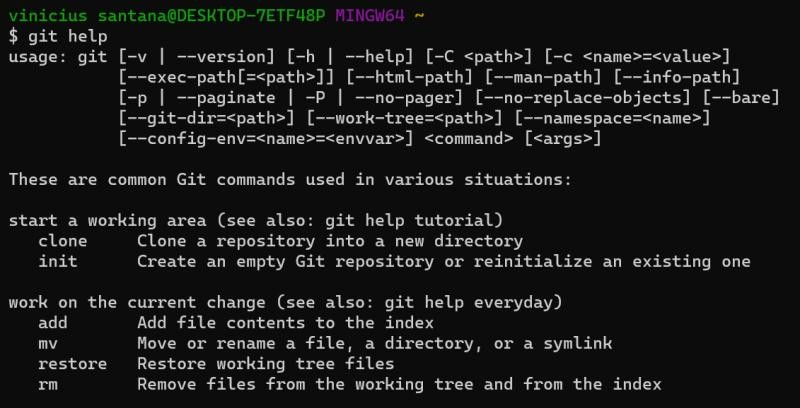
If you don’t have GIT installed, the output will be similar to:
git: command not found
If you don’t have GIT installed, install it following the instructions available at: https://git-scm.com/downloads
To check if SVN is installed on your computer, run the following command in the terminal:
svn help
The output of this command will be similar to:
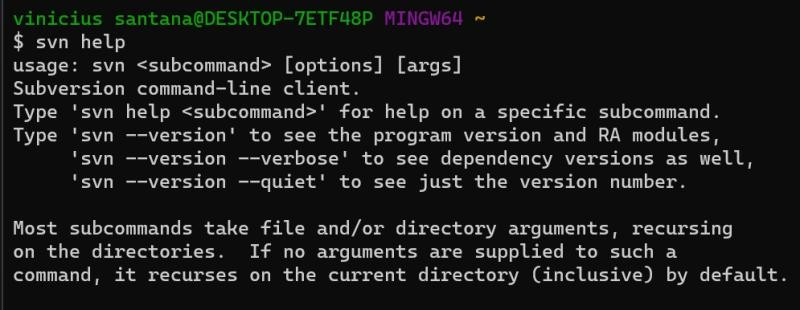
If you do not have SVN installed, the output will be similar to:
svn: command not found
If you do not have SVN installed, install it following the instructions available at: https://subversion.apache.org/quick-start
Create the authors file.
In SVN, users are identified only by their username. In GIT, users are identified by both their username and email address. Creating the authors file is an important step in the process of migrating repositories from SVN to GIT. This file is used to map the authors of SVN commits to GIT users. This is necessary because SVN and GIT use different authentication and user identification systems. The authors file is created to ensure that commit authors are correctly identified in GIT.
Within the directory where the SVN repository is located on your computer, run the command to create the authors file:
svn log -q | awk -F '|' '/^r/ {gsub(/ /, "", $2); sub("$", "",$2); print $2" = "$2" <"$2">"}' | sort -u > authors.txt
The result will be a file containing a list of usernames found in the SVN repository. To correctly identify them, you should edit this file so that each line has the following format:
svn_username = Full Name <email@example.com>
Where svn_username is the SVN username, Full Name is the author’s full name, and email@example.com is the author’s email address. This way, each SVN username will be correctly identified by its corresponding name and email address in GIT.
Initialize the GIT repository
In the directory where you want to create the GIT repository, run the following command:
git svn init <repo_url> --no-metadata
Replace <repo_url> with the URL of the SVN repository you want to convert. It is possible and encouraged in the case of an SVN repository containing source code from multiple stacks, you run this manual multiple times, creating the directory and GIT repository for each stack. Ex:
- git svn init https://repo.com.br/projeto/trunk/web/ –no-metadata
- git svn init https://repo.com.br/projeto/trunk/app/ –no-metadata
- git svn init https://repo.com.br/projeto/trunk/backend/ –no-metadata
Configure the authors file
To link the new repository to the authors file, execute the command:
git config svn.authorsfile <authors_file_created>
When executing this command, replace <authors_file_created> with the path to the file created earlier. Remember that this file will be responsible for correctly identifying each username in SVN to a name and email in GIT.
Configure branches (optional)
Within the created GIT repository, configure the branches you want to import. To do this, add the following configuration line to the .git/config file:
[-remote "svn"]
    branches = branches/feature*:refs/heads/*
The .git/ directory is hidden by default in systems; look in your operating system settings for the option to show hidden folders and files.
Start the conversion
Execute the command to start the repository conversion. This command may take a considerable amount of time depending on the size of the repository.
git svn fetch
This process can be interrupted, so you can start it one day, stop, and continue it at another time.
Conclusion
This article presents a step-by-step guide to converting an SVN repository to a GIT repository using the git-svn tool. It explains the main commands needed for the migration. Remember that your needs may differ. For troubleshooting, please refer to the official documentation for the tool: https://git-scm.com/docs/git-svn/pt_BR.
I hope this article is useful for those who want to transition from SVN to GIT, or simply learn more about these two tools.
Comments